
{{ w.title }}
- {{ p }}
Platform · Optimisation
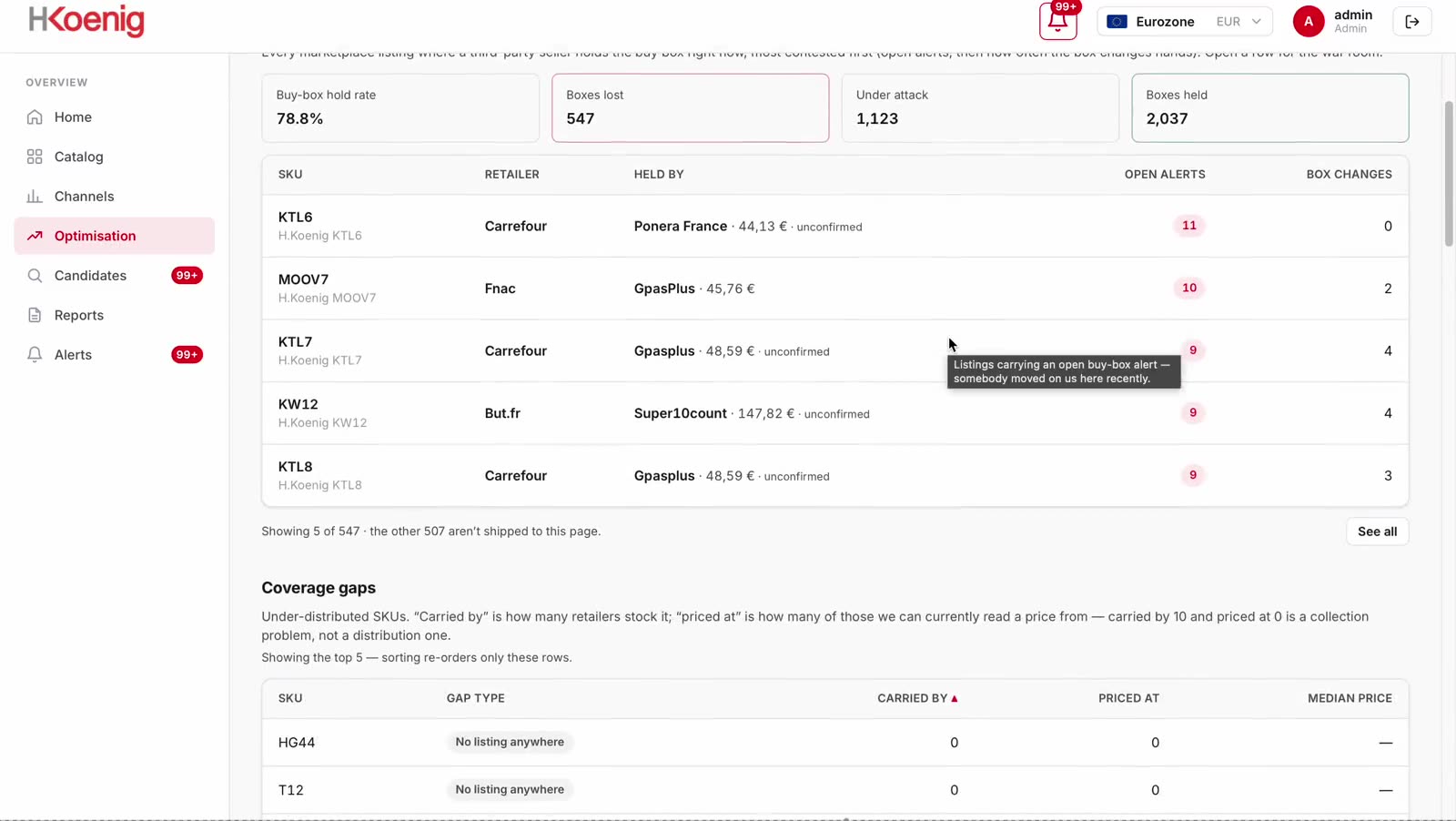
Optimisation is the working screen for commercial teams. It lists every product where another seller holds the buy box, names that seller, shows the price they are winning at, and orders the list by revenue at risk rather than by discount percentage.
The screen
Contested listings appear at the top, ordered by the revenue each one puts at risk. The coverage table below shows retailers that stock your category but none of your products. Both sit on one screen because both are decisions about where a team spends the week.
Platform shown through a client account, with permission, for data demonstration purposes.
Platform shown through the H.Koenig account, with H.Koenig's permission, for data demonstration purposes.
The decisions it supports
Revenue at risk, not discount depth. A 40% reduction on a €12 accessory matters less than 8% on a €400 product holding the buy box on your highest-volume listing.
The seller as a customer sees them, with every other product of yours they list. One operator running eight storefronts is a single commercial conversation, not eight separate ones.
Each row shows the price to match, the reference price it undercuts, and whether the seller is an authorised distributor or one you have no relationship with.
Why the ranking matters
An unordered list of problems cannot be worked. Optimisation groups open items by category of loss and sizes each group, so a team can direct a week at the largest one. On one client channel the ranking placed price dispersion four times above lost buy boxes — the opposite of what the team expected.
Open item counts from a single export file, one retailer, 28 August 2026, so the categories are directly comparable. Across the whole account the same scan recorded 575 lost buy boxes over 86 retailers.
Platform shown through the H.Koenig account, with H.Koenig's permission, for data demonstration purposes.
Chart: open alert counts on one channel for one day — 157 price dispersion, 36 buy boxes lost, 27 unbuyable pages, 1 duplicate listing.
On each row
Enough to act without opening another screen, and enough to send to a distributor without rewriting.
Named as a customer sees them on the listing, not as an internal account identifier.
Ownership is read from the captured buy-box timeline rather than inferred from price.
The gap between the winning price and your reference price for that market, in currency.
A figure a commercial team can take into a negotiation, rather than an index.
When the buy box moved and how long the current seller has held it.
Measured against the previous scan, not a monthly average.
Every other product of yours the same seller lists, across every retailer monitored.
This is what turns a single listing into an identifiable supply route.
If your own offer was out of stock, the buy box could not have been won this cycle.
Availability and price are reported separately because they require different actions.
Retailers stocking your category and none of your products — the loss that generates no alert.
No event occurred on these retailers, which is precisely why they go unnoticed.
Fields and columns
Six columns, each sortable, each present in the export.
| Column | Contents | Purpose |
|---|---|---|
| Product | Your SKU and product name | Matched on title and identifier |
| Retailer | The retailer the listing sits on | Identifies the account to contact |
| Buy-box seller | The winning seller's storefront name | Never an internal identifier |
| Winning price | What a customer pays today | In the market's own currency |
| Gap to reference | Distance below your reference price | The figure a negotiation turns on |
| Last captured | When the page was last read | So no figure is quoted stale |
The default sort is revenue at risk. The sort criterion is stated on screen rather than implied, so a team can change it deliberately.
In practice
The total is context. The first ten rows are the week's work, and the default ordering makes that true without any filtering.
Multiple rows usually resolve to one operator. Addressing the operator closes all of them; addressing rows individually closes none permanently.
A distributor undercutting your reference price is a contract discussion. A seller with no supply relationship is an enforcement question.
The screen exports with your filters applied, so dated evidence reaches the meeting instead of a screenshot.
Platform shown through a client account, with permission, for data demonstration purposes.
Related
Seven screens, one daily scan underneath all of them.
The problem
Right now, a seller you never appointed a reseller with your stock a marketplace trader an account you cannot name somebody undercutting you is costing you revenue and losing you customers.
They win the sale on a listing you built, to a customer who believes they bought from you. If that order arrives late, damaged or grey-market, you lose a customer and the revenue both — and neither ever appeared in your channel to begin with.
Undercutting is only the visible half. The rest of the damage never announces itself.
And it is never just one thing
A lost buy box is the one you can see. Merqi reads all seven on the same scan, so the damage you have not noticed shows up beside the damage you have.
Why one row matters
The featured offer is not a ranking, it is the default. The other sellers sit behind a link most shoppers never open, and on mobile they are not on screen at all. So when someone else holds the box on your listing, the page still converts — for them, on your product, at a price you did not set.
What a lost box actually costsThe size of the prize
10–30%+
revenue our clients can recover
Every buy box lost to an unauthorised seller is a sale made at a price you did not set, on a listing you paid to build. Recovering those listings, closing the coverage gaps and holding distributors to their terms is where the range above comes from.
See what one scan cycle foundIndicative range. What Merqi recovers for your catalogue depends on how many of your listings are contested and how far price has drifted — the first report tells you which.
How it works
Every finding starts as a row in the same scan. What changes is the question you bring to it.
Platform shown through the H.Koenig account, with H.Koenig's permission, for data demonstration purposes.
What you get
The first two are what most brands come for. The rest is what they did not know they were missing — and the platform they read it all in.
See everything the platform reads{{ c.body }}
{{ c.detail }}
{{ c.body }}
{{ c.detail }}
On one client account, Merqi reads 4,196 listings across 78 active retailers every day and names every seller holding a box that should have been theirs. Catalogues are unlimited — this is one brand’s shelf, not our ceiling.
July 2026 monitoring cycle, as of 31 July. Platform shown through the H.Koenig account, with H.Koenig's permission, for data demonstration purposes.
Case study and research
One client's ledger, and the two questions every brand asks once they have seen it.
Platform shown through the H.Koenig account, with H.Koenig's permission, for data demonstration purposes.
Go deeper
The latest intel on how buy boxes are set, new legislation across the jurisdictions we cover, how to enforce MAP legally, and breakdowns on dealing with rogue sellers — and how to approach each of them using the right ecommerce intelligence.
We’ll use your details to respond to this request. See our Privacy Notice.
{{ page.eyebrow }}
{{ page.sub }}
{{ page.clientCaption }}
{{ page.eyebrow }}
{{ page.sub }}
Platform shown through a client account, with permission, for data demonstration purposes.
{{ art.eyebrow }}
{{ art.sub }}
{{ art.pageNote }}
{{ art.byline }}
{{ art.bylineRole }}
{{ art.disclaimer }}
{{ art.standfirst }}
{{ p.text }}
{{ p.text }}
{{ p.text }}
| {{ col }} |
|---|
| {{ cell.v }} |
{{ r }}
Legal
{{ legalDoc.version }}
{{ rn.t }}
| {{ hd }} |
|---|
| {{ cl.v }} |
{{ rn.t }}
| {{ hd }} |
|---|
| {{ cl.v }} |
{{ legalDoc.lastUpdated }} {{ legalDoc.foot }}
{{ b.eyebrow }}
{{ b.lede }}
{{ c.body }}
{{ c.detail }}
{{ c.body }}
{{ c.detail }}
Platform shown through the H.Koenig account, with H.Koenig's permission, for data demonstration purposes.
{{ b.eyebrow }}
{{ b.lede }}
Platform shown through the H.Koenig account, with H.Koenig's permission, for data demonstration purposes.
{{ b.eyebrow }}
{{ b.lede }}
{{ v.body }}
Hover a panel to play its recording. Platform shown through the H.Koenig account, with H.Koenig's permission, for data demonstration purposes.
{{ b.eyebrow }}
{{ b.lede }}
{{ b.eyebrow }}
{{ b.lede }}
{{ b.eyebrow }}
{{ s.body }}
{{ b.eyebrow }}
{{ b.lede }}
{{ p }}
{{ s.pull }}
{{ b.note }}
{{ b.eyebrow }}
{{ b.lede }}
| {{ c }} |
|---|
| {{ cell.v }} |
{{ b.note }}
{{ b.eyebrow }}
{{ b.lede }}
| {{ c }} | |||||
|---|---|---|---|---|---|
| {{ r.retailer }} | {{ r.market }} | {{ r.categories }} | {{ r.buybox }} | {{ r.refresh }} | {{ r.added }} |
{{ b.note }}
{{ b.eyebrow }}
{{ b.lede }}
{{ b.eyebrow }}
{{ b.lede }}
{{ b.note }}
Platform shown through the H.Koenig account, with H.Koenig's permission, for data demonstration purposes.
{{ b.eyebrow }}
{{ b.lede }}
{{ b.note }}
Platform shown through the H.Koenig account, with H.Koenig's permission, for data demonstration purposes.
{{ b.eyebrow }}
{{ b.lede }}
{{ p.body }}
{{ b.note }}
{{ b.eyebrow }}
{{ b.lede }}
{{ s.value }}
{{ s.label }}
{{ s.sub }}
{{ b.note }}
{{ b.eyebrow }}
{{ b.lede }}
A workbook is generated at the end of each scan cycle. The first one appears here once your first scan completes.
Get a free audit of your listings{{ exportSheet.footnote }}
{{ b.note }}
{{ b.eyebrow }}
{{ b.lede }}
{{ b.aside }}
{{ b.eyebrow }}
Page not found
The link may be old, or we may have moved it. Nothing is broken on your side.
{{ b.eyebrow }}
Buy-box hold rate
Alerts by kind, by week
{{ b.note }}